
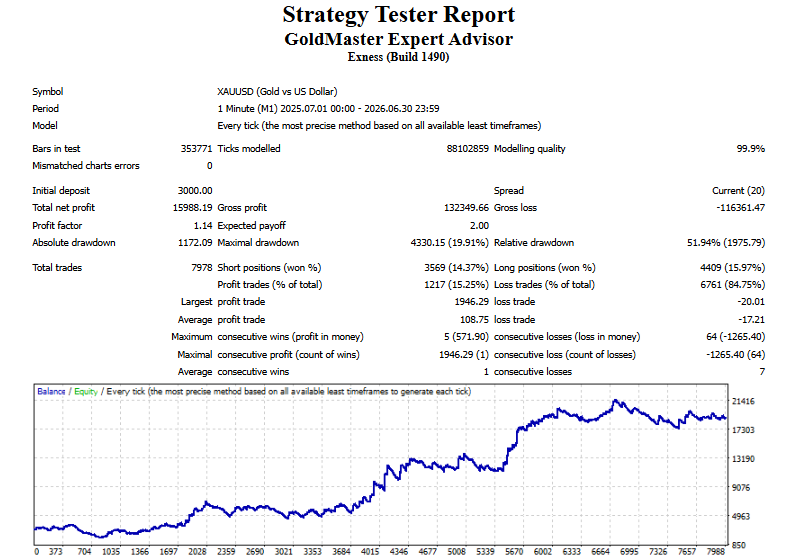




GoldMaster Expert Advisor
Lots Size:
0.10
Currency Pair:
GoldMaster Multi-Confirmation Trend System
GoldMaster is a rules-based Expert Advisor built for XAUUSD, designed around a simple principle: don’t enter a trade until multiple independent signals agree on direction. Rather than relying on a single indicator crossover, GoldMaster stacks five separate confirmation layers before it takes a position — and manages every trade with a fixed, disclosed risk per entry.
How It Works
GoldMaster combines trend, momentum, and higher-timeframe context into one entry decision:
- Moving Average Ribbon — Price must be positioned on the correct side of a five-line moving average ribbon (a staggered blend of short- and long-period averages) before any signal is considered.
- Parabolic SAR Confirmation — SAR position must align with the trade direction, filtering out entries against short-term momentum shifts.
- MACD Momentum Check — The MACD line must be sloping in the same direction as the proposed trade, avoiding entries into fading momentum.
- Higher-Timeframe Trend Filter — A separate trend read on a higher timeframe must confirm the same direction, with a minimum slope requirement to avoid trading flat, directionless conditions.
- Stochastic + RSI Composite Filter — A combined oscillator reading must support the trade before entry, and is also used to manage exits.
All five conditions must align. This is a deliberately selective approach — GoldMaster is built to take fewer, more qualified setups rather than trade every ribbon touch or indicator cross.
OUR PRICING
After the complete payment process, Please email transaction receipt with your trading account numbers to admin@ea4u.info
MT4 Expert Advisor Programming
If you are a Forex trader and are in need of an experienced programmer to convert your trading strategy into an Expert Advisor (EA) then you have come to the right place. We would be happy to consider your idea and have the experience and knowledge to make it happen. Feel free to contact us any time
GoldMaster EA has the following minimum deposit requirements:
– Safe mode $5000 ($500 for micro and $50 for cent accounts)
– Normal mode $4000 ($400 for micro and $40 for cent accounts)
– Aggressive mode $3000 ($300 for micro and $30 for cent accounts)
How to install Expert Advisors into Metatrader
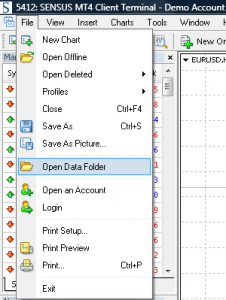
1. Open MT4 > click on File > Open data folder.
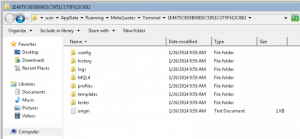
2. Here you will find a folder called MQL4, this is the new “home” for all your .ex4 or .mq4 files you have.
3. Open folder MQL4. Here you will find these folders:
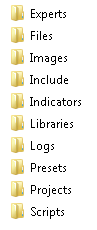
4. Copy your EA (experts advisors) files into MQL4/Experts folder.
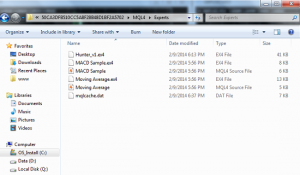
5. Now restart your MT4.
That’s it! Now you can enjoy your EA Good luck with them!